

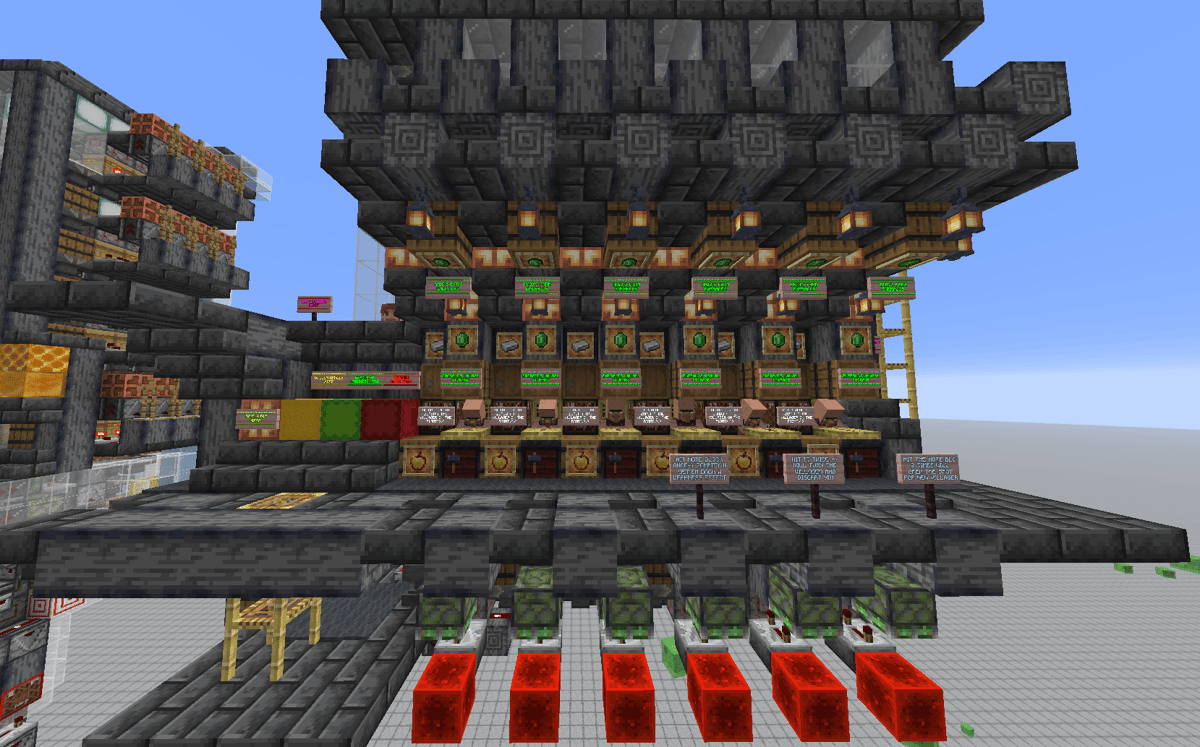
Automatic Trading Hall for Late-Game Survival
Features
- Villager zombification system.
- Weakness arrow dispenser.
- Dedicated item filters for each trade, with individual storage (for example, iron for toolsmiths).
- Golden apple storage.
- Automatic golden apple dispenser.
- Disposal area for unwanted villagers.
- Input for new villagers from a villager breeder.
- Emerald input from a raid farm (with additional storage).
- Automatic minecart recycling.
Fully expandable!
How It Works
Each villager has a note block on its left side. When you hit the note block, that villager will drop into a rail system, and a minecart will automatically be dispensed to transport it to the zombification system.
Once the zombie converts the villager, the system detects the change in its hitbox and automatically activates the return route. During the trip back, the zombie villager is hit with a Weakness arrow from a dispenser and then carried up to the curing chambers.
Once it reaches its assigned chamber, simply activate the mechanism. A golden apple will be automatically dispensed for the player to use, allowing the villager to be cured.
Removing Unwanted Villagers
If you hit the note block twice, the villager will go through the same zombification process. However, its chamber will remain locked, causing the minecart to continue to the end of the system instead.
There, the zombie villager will pathfind toward turtle eggs, fall onto wither roses, and die.
To unlock that chamber again, simply hit the note block a third time. It will be ready to receive another villager whenever you want.
Automatic Restocking
To the left of the villagers, you'll find three labeled shulker boxes.
Place the following items inside:
- Golden apples.
- Weakness arrows.
- Trading items.
Each item will automatically be sorted into its corresponding storage and will be ready for use.
I've also included a barrel on the far right for depositing minecarts. Although minecart recycling is fully automatic, it's always useful to have a way to refill them manually if needed.
Notes
Note 1: If the honey block is replaced with glass after pasting the schematic, simply break the glass and place the honey block again. This only happened to me once, and I'm not sure why, but it's worth mentioning.
Note 2: Hitting the note blocks too quickly can break the system. Wait at least 1 second before hitting the note block a second time (only when removing a villager). During normal operation, a single hit is all that's needed.
Note 3: Don't forget to configure the upper item filters with the items you want to trade. For example, if you want to trade sticks for emeralds, fill the corresponding filter with 18 sticks and 4 renamed filler items. Repeat this process for every villager and trade you want to automate.
Recommendation
Before building this Trading Hall in your survival world, paste the schematic into a creative world and familiarize yourself with how it works. Once you've tested everything, you're ready to build it in survival.

Comments